Search (Don't Edit)

Affiliate Program ”Get Money from your Website”

Sunday, May 13, 2012

TrickedOutTimelime Creates Freaky Facebook Timeline Covers

| |
1 comments


Love to make Tricky Timeline Covers For your Pals ???? or Yourself or Fan page ???? Then use 
This online Software .If you love to impress your Facebook friends or page fans than you know that you have a way to post a nice image on your timeline and than people can enjoy that image. We have also posted earlier a good online website that helps you in creating nice timeline covers for Facebook. But today we found another awesome website which can take your covers to the next level by giving a freaky touch to it. Well many professionals have already created covers like these and now you can also create some covers like below and impress your friends.
trickedouttimeline-demo
TrickedOutTimeline is a online trick covers creating website which I just discovered right now and enjoyed creating my first cover on it and thought that I should share the whole bunch of procedure for creating your own timeline covers. With TrickedOutTimeline you can give your profile a zoom effect, a mosaic old touch, merge two images together and create some awesome result and lots more.

How to make Tricky Timeline Cover :

trickedouttimeline-effects-layout
1. Visit TrickedOutTimeline.com and click on any one of the above layout’s given on their website. (I tried the zoomable one and output was awesome.)
trickedouttimeline-upload-image
2. Now you will be taken to the image uploading option, from where you can upload an image from your computer or choose the current Facebook profile proto by signing in.


3. Now just adjust the selection on the image for what part you need and check the preview rendering on the right, when satisfied with the preview just click on the Done option.


4. Now your image will be precessed and you will get a option to like their page before you can download your images, just like their page and you will get image downloading options like below.
download-cover-image
5. Download both the images Cover and Profile, now just login to your Facebook account and than click on change profile and change cover and upload the ones you have downloaded from this website.
Voila ! Enjoy these new tricky and freaky timeline covers for your Facebook, now its time to share your profile with your friends and impress them up, make sure to like this post if you got benefited from it.
Read More

Saturday, April 28, 2012

Change the colour of FACEBOOK to any colour you wish

| |
0 comments
Normal Facebook
New Facebook layout
Hi!  Friends today ComputerSavieZ bring you a new trick to change the colour of facebook
1) Just install this extension click here to download
2) After Downloading open the file and open facebook on other hand
3) Click on the extension and there would be two options Colour 1 and Colour 2 the colour 1 changes the layout of the facebook and colour 2 changes the icons of notifications and other icons and now the colour of facebook has changed now just enter the colour name and you are done with your desired colours !!!!!!!

and if you want to know the colour code just go here http://www.hexcolor.in/
Read More

Thursday, April 26, 2012

Make a professional Email Address (FREE!!!!)

| |
0 comments
Hi friends today Computersaviez bring you a new thing !!!!
Ever thought make a professional Email id ? What is a professional email id ? Professional email id is a email that is not of yahoo,orkut,gmail etc. It's like @techie.com or something like this so today make a free professional email id with over 200 choices : ) isn't it great and all different from the boring ones make a professional id and amaze your friends. Make it by the following steps:-

If someone talks about the email service you are using your answer would be GMail, Yahoo or Hotmail and obviously you would be having some boring email address like yourname.yourbirthyear@gmail.com or yourname.yourphonenumber@yahoo.com but what if you wanted to create some unique name based on your profession likeyourname@teacher.com or yourname@doctor.com or you can also choose from any other name you would like.
mail.com email registerWell Mail.com brings you all these possibilities for free, with Mail.com you can create your personalized email under any niche you would like you can choose from the regular professional ones, or choose any domain from your hobbies category or give it some techy taste like yourname@techie.com whooh that looks quit hot for a blogger like me. You can check out all domain names here.


Register Email Address with Mail.com :

So now you can register your own professional, unique email address using mail.com
registration page, just add all the basic information choose which domain you want to go with and register your own personalized email address.
Read More

Wednesday, April 25, 2012

Install Paid Android Apps free on your Android Phone

| |
0 comments
Like Paid apps on Andriod but don't want to download them ? Then why not Download them For free ? Other way is to download cracked .apk apps from computer and transfer it to your mobile device through data cable(USB) or bluetooth device.
Well hope that you like this applications and would love to download many many apps. If you find this post useful than make sure to share it with all your friends.


blackmart-alpha-app


It’s a simple .apk app which you can transfer to your device and than install it in a normal way.
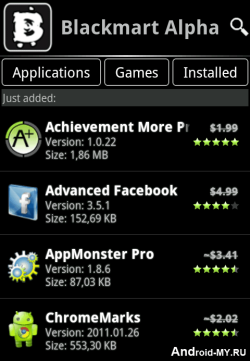
Its officially not known as Black Market but its called BlackMart Alpha, it’s a new version which is the improved one and brings many bug fixes. You can Download BlackMart Alpha Android app and than transfer that file to your android device.
After installation Fire-Up the app and your will interface like on the right hand side image, juts browse entire collection of wonderful apps and games which can be downloaded easily.

Read More

RUN MOST OF ANDROID APPS NOW ON YOUR PC!!!!

| |
0 comments
Want to run most of the android apps on your pc because you like android apps and don't have a android phone then why do you worry when Computersaviez is here your tech friend.
Hi friends ComputerSaviez bring you a way of using WhatsApp on your windows !!!!
WhatsApp  is popular free messaging client which is available for iOS, Android, Nokia and Blackberry, but still we have no client for Windows PC officially released by the WhatsApp team. Well you can imagine having WhatsApp on your PC and how fast you will be able to send and receive text messages as you always be on one device so you can handle everything right there. So we found an unofficial client which is supposed to be a dummy version of Android running on your PC.

BLUESTACK APP PLAYER ANDROID EMULATOR:
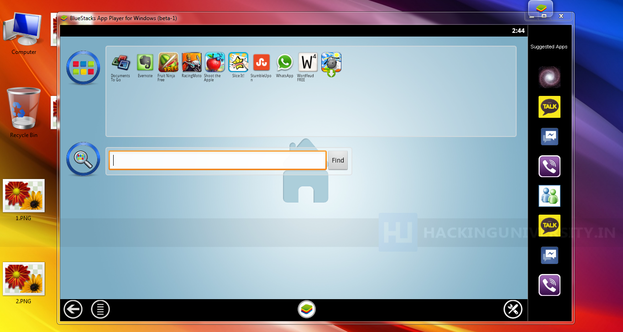
BlueStacks App Player helps you install WhatsApp and thousands other application because its an Android operating system running on your Windows PC. Now obviously its not like you will get that same kind of experience you can do with a touch phone and Android installed on it but still if you are a WhatsApp fan than I must that this software is must for you because WhatsApp experience on this one is simply unbelievable faster texting and media exchanging.

bluestacks-app-player-windows

Steps to Install WhatsApp on BlueStacks App Player :


So if you are interested in using WhatsApp right on your PC that you can grab some installation knowledge from below and start experiencing right now.

1.
 Download BlueStacks App Player for Windows PC.
2. After you have downloaded the above software, start installing it and it will start downloading its package from the internet, it will take some time so sit back and have a cup of coffee.
3. So after downloading it will install and now you will see their user interface, now you have to sign up for your new account or if you already have their account than you can login.
bluestacks-whatsapp-messenger
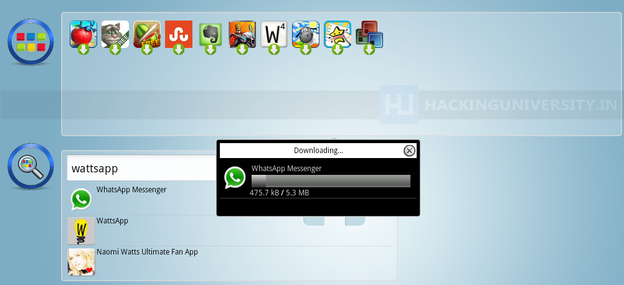
4. Now just search for the WhatsApp like in the above image or find it from the popular downloads hovering right above in the Rocket Dock, after you find it click on it and it will start downloading the app.
5. After WhatsApp is installed click on it and you will see a Terms and Conditions page where you have to click on Agree and than you will be on their main phone verification page.

bluestacks-whatsapp-verification
6. Now just select your country and than insert your mobile number and than click on OK.
bluestacks-whatsapp-verification

7.
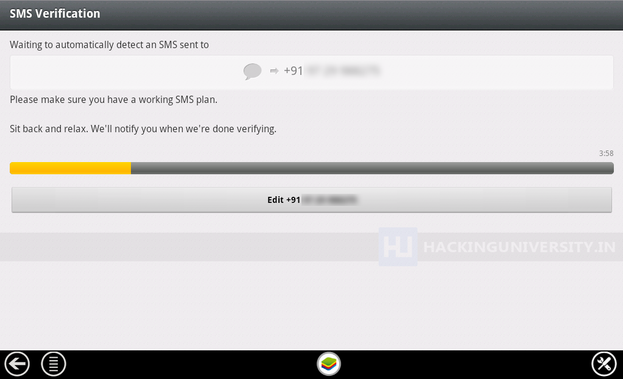
 Now it will start the process of sending you the verification message on your mobile, if that thing fails you also have an option to call your number for the verification message. So now just insert that code and click on OK boom you have successfully activated your WhatsApp messenger on your Windows PC.
bluestacks-whatsapp-messages

8.
 So now WhatsApp is ready for some action, select your already created groups, if you were having one on your mobile or you can start sending text or media messages to your friends and create another new group, so I was just messing around my group Wild Hogs, and tried sending some messages and delivery was amazingly fast and responsive.
So now enjoy WhatsApp on your Windows PC with this amazing BlueStacks App Player, well you can also download and install other amazing Android Application which you can search and than download, hope you liked this lengthy tutorial, please share it with all your friends.

Note:- It will slow down your pc when you run this app 
Read More

Followers

//SEO SCRIPT POWERED BY www.alltechbuzz.in